
Contact Contextli support
Email [email protected], or in the app click Help > Talk to support. Include your app version, your system and a screenshot or log file.
On this page
Email [email protected], or in the Contextli app click Help > Talk to support. Include your app version, your computer’s system and a screenshot or log file so we can fix it faster.
From the app
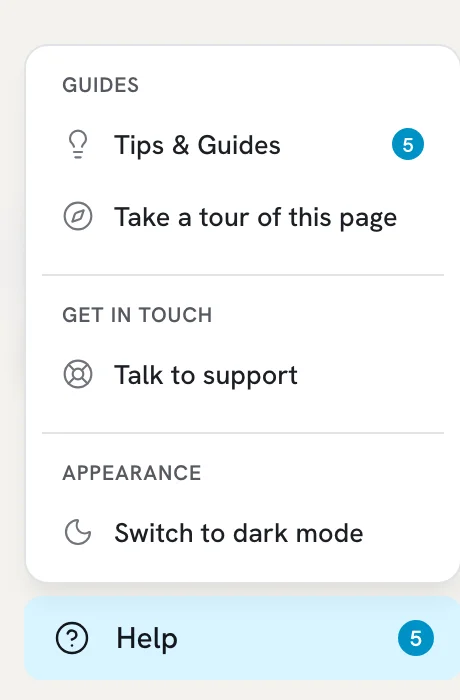
- Click Help at the bottom of the sidebar.
- Click Talk to support.
- Choose Support Request or Report a Bug.
- Fill in Your Email Address, an optional Subject and your Message.
- Click Submit Request.
By email
Write to [email protected] from the email address of your Contextli account.
What to include
- What happened and what you expected. For a hotkey problem, say whether nothing happens, you see an error, or it records but does not paste.
- Your Contextli version: Settings > General > App Updates shows Current version.
- Your system: Mac (Apple Silicon or Intel), Windows or Linux, or the phone model.
- A screenshot or short screen video. On Windows, Windows key + Alt + R starts a screen recording.
- The log file, for bugs.
Where the log files are
The log is logs/contextli.log inside the Contextli data folder:
| System | Folder |
|---|---|
| Mac | ~/Library/Application Support/Contextli/ |
| Windows | %APPDATA%\Contextli\ |
| Linux | ~/.config/Contextli/ |
To open the folder:
- Mac: in Finder, choose Go > Go to Folder, paste the path and press Return.
- Windows: press Windows key + R, paste the path and press Enter.
- Linux: open the path in your file manager or terminal.
Attach contextli.log to your email. Logs help us see errors. Do not edit them.
Billing and account requests
For cancellations, refunds and account changes, email [email protected] from your account email. See Cancel your subscription and Refund policy.
Related articles
Did this answer your question?
Thanks for letting us know.Thanks, we will improve this article. Want a hand right now?
Still need help?
Chat with us and get an answer in a few minutes.